

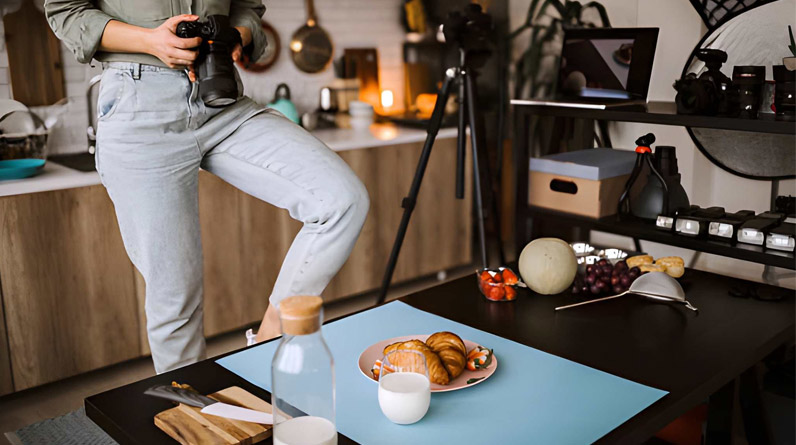
Taking professional-looking product photographs at home has become an essential skill for online sellers, small business owners, and creative entrepreneurs across the UK. Whether you’re listing items on Etsy, building a Shopify store, or selling on Amazon, high-quality product images can make the difference between a sale and a scroll-past.
The good news? You don’t need expensive studio equipment or professional photography experience to capture compelling product images. With a modest investment in basic gear and an understanding of fundamental techniques, you can create polished photographs that showcase your products effectively and help build customer trust.
This guide walks you through everything you need to know about setting up a home photography space, mastering lighting techniques, and editing your images for professional results.
Essential Equipment for Home Product Photography
Before diving into techniques, let’s examine the core equipment you’ll need. The beauty of home product photography is that you can start with what you already own and gradually upgrade as your needs evolve.
Camera Options
Your camera choice depends largely on your budget and technical comfort level. Modern smartphones, particularly recent iPhone and Android models, capture remarkably high-resolution images suitable for most e-commerce applications. The latest devices offer impressive sensors, automatic settings, and the convenience of immediate editing and uploading.
If you prefer more control over your settings, an entry-level DSLR or mirrorless camera provides greater flexibility. Models like the Canon EOS Rebel series or Nikon D3500 offer excellent image quality without breaking the bank. These cameras allow you to adjust aperture, shutter speed, and ISO manually, giving you precise control over the final image.
For product photography specifically, the ability to shoot in manual mode and save images in RAW format provides the most flexibility during editing. However, don’t let equipment limitations hold you back—start with what you have and focus on mastering lighting and composition first.
Tripod
A sturdy tripod is arguably more important than an expensive camera. It eliminates camera shake, ensures consistent framing across multiple shots, and allows you to work with slower shutter speeds in lower light conditions. This consistency is particularly valuable when photographing multiple products that need to maintain the same perspective and composition.
Budget-friendly tripods are widely available for under £30 from retailers like Argos or Amazon. If you’re using a smartphone, invest in a proper phone mount attachment that screws into the tripod head. The stability alone will dramatically improve your image sharpness.
Background Materials
A clean, neutral background keeps the focus squarely on your product. For most e-commerce photography, white backgrounds remain the standard. They’re easy to edit, universally flattering, and meet the requirements of major selling platforms.
The most affordable option is white poster board from your local art supply shop or supermarket. These typically cost a few pounds and work brilliantly for smaller products. For larger items, consider a roll of white craft paper or even a white bedsheet in a pinch.
If you plan to photograph products regularly, investing in a proper seamless paper backdrop provides a professional sweep—the curved transition from horizontal to vertical that eliminates visible corners or edges behind your product.
Lighting Solutions
Natural light from a window is the most accessible and flattering light source for beginners. It’s free, abundant, and creates soft, appealing shadows when used correctly. The key is finding the right window and time of day.
North-facing windows provide the most consistent, diffused light throughout the day in the UK. If you’re working with south, east, or west-facing windows, you’ll need to work around the direct sunlight, which can create harsh shadows and overexposed highlights.
For more control and consistency, particularly if you plan to shoot in the evening or on overcast days, consider investing in a basic continuous LED light kit. These are more affordable than strobe lighting and allow you to see exactly how the light affects your product in real time.
Reflectors and Bounce Cards
Reflectors help control shadows by bouncing light back onto your product. Professional reflectors are available, but white foam board from a pound shop works equally well for most situations. Cut a piece approximately A3 size, and you’ve got a versatile light modifier that costs less than a coffee.
You can also use black foam board to deepen shadows when photographing white products on white backgrounds, adding definition and preventing the product from appearing washed out.
Setting Up Your Home Photography Space
Transforming a corner of your home into a functional photography space requires minimal effort and no permanent modifications.
Choosing Your Location
Identify a space near a large window with consistent natural light. This might be a dining room, spare bedroom, or even a cleared corner of your living room. The key requirements are adequate light, enough space to position your table and camera, and a neutral environment free from distracting colours or patterns.
Measure your available space before purchasing equipment. A folding table approximately 60-70cm wide provides sufficient room for most products whilst remaining manageable in smaller homes.
Creating Your Shooting Surface
Position your table close to the window without intersecting any windowsill shadows. Start with the window at a 90-degree angle to your setup, then experiment with different angles to see how the light quality changes.
Create your backdrop sweep by attaching your white background material to the wall with removable tape, allowing it to curve gently onto the table surface. This seamless transition eliminates harsh lines and creates that professional floating effect in your final images.
Camera Positioning
Mount your camera on the tripod at roughly the same height as your product. For most items, shooting at eye level to the product creates the most natural perspective. Place the tripod far enough back to capture the entire product with some breathing room around the edges.
Once you’ve found the ideal position, mark the tripod leg positions with tape on the floor. This allows you to return to exactly the same setup for future shoots, ensuring consistency across your product catalogue.
Mastering Natural Light
Understanding how to work with natural light is the most valuable skill in home product photography. Light quality changes throughout the day and varies with weather conditions, so learning to read and adapt to these changes is essential.
Time of Day Considerations
The quality of natural light varies significantly throughout the day. Mid-morning and mid-afternoon typically offer the most consistent, diffused light. Avoid shooting during the golden hour (early morning or late evening) unless you specifically want warm, dramatic lighting, as this can make colour accuracy challenging.
Overcast days often provide the most beautiful light for product photography. The cloud cover acts as a natural diffuser, creating soft, even illumination without harsh shadows. British weather, with its frequent cloud cover, can actually be advantageous for home product photographers.
Controlling Window Light
Direct sunlight streaming through your window creates harsh shadows and bright hotspots that are difficult to manage in post-processing. If you’re shooting on a bright day, diffuse the light using a sheer white curtain or a large piece of translucent white fabric hung in front of the window.
The size of your light source relative to your product determines how soft or hard your shadows appear. A larger window creates softer, more gradual shadows, whilst a smaller window produces more defined, dramatic shadows. Move your setup closer to the window for softer light, or further away for slightly harder light with more defined shadows.
Using Reflectors Effectively
Position your white foam board opposite your light source to bounce light back into the shadowed side of your product. The distance and angle of the reflector allows you to control the intensity of the fill light. Closer positioning creates brighter, more even lighting, whilst placing it further away maintains more shadow definition.
For transparent or translucent products like glassware or cosmetics bottles, experiment with backlighting by positioning the product between the window and your camera. Use reflectors on both sides to control how light passes through the product.
Camera Settings Explained
Understanding the relationship between aperture, shutter speed, and ISO allows you to take creative control over your images rather than relying on automatic settings.
Aperture
Aperture controls the depth of field—how much of your image remains in sharp focus. For product photography, you typically want the entire product in focus, which requires a smaller aperture (higher f-number). Settings between f/8 and f/11 work well for most products, providing front-to-back sharpness whilst maintaining good lens performance.
If you’re creating lifestyle shots where you want the product sharp but the background softly blurred, use a wider aperture (lower f-number) like f/2.8 or f/4.
Shutter Speed
With your camera mounted on a tripod, shutter speed becomes less critical as you don’t need to worry about camera shake. Adjust your shutter speed to achieve proper exposure based on your aperture and ISO settings. The camera’s built-in light metre helps ensure correct exposure—aim for the indicator to sit at or near zero.
For natural light photography, shutter speeds between 1/60th and 1/250th of a second typically work well, though you may need slower speeds in dimmer conditions.
ISO
ISO determines your camera sensor’s sensitivity to light. Lower ISO values (100-400) produce cleaner images with less digital noise but require more light. For product photography on a tripod with good natural light, keep your ISO as low as possible—typically 100 or 200.
If you’re working in lower light conditions and have already maximised your aperture and slowed your shutter speed, gradually increase ISO as needed. Modern cameras handle ISO 800 or even 1600 quite well, though you’ll notice some grain in your images.
White Balance
White balance ensures colours appear accurate in your images. Natural daylight has a colour temperature around 5500K, which your camera’s daylight white balance setting should handle well. However, if you’re mixing natural light with artificial lighting, or shooting on an overcast day, you may need to adjust.
Many photographers shoot in RAW format and adjust white balance during editing, as this provides the most flexibility. If you’re shooting JPEGs, use a grey card in your first test shot—this gives you a neutral reference point for correcting colour balance in post-processing.
Composition and Styling
Technical excellence means little if your composition doesn’t effectively showcase the product.
Product Placement
Position your product roughly in the centre of your frame, allowing adequate space around all edges. This breathing room keeps the image from feeling cramped and provides flexibility for different crops or aspect ratios.
For products with clear front-facing orientation like bottles or electronics, ensure any labels, logos, or important features face the camera squarely. Use a spirit level or your camera’s built-in grid display to check that vertical lines remain truly vertical—tilted products appear unprofessional.
Multiple Angles
Customers appreciate seeing products from various perspectives. Capture your primary hero shot first, then photograph from different angles without moving your camera position. Instead, rotate the product on your table surface. This maintains consistent lighting and framing across all shots.
Standard angles include straight-on, three-quarter view, side profile, and top-down. For clothing or dimensional products, include detail shots highlighting texture, materials, or special features.
Props and Context
Props can enhance your product photography by providing scale, suggesting use cases, or creating atmosphere. However, they should complement rather than compete with your product. Keep props simple and ensure they’re in keeping with your brand aesthetic.
For a bottle of craft gin, for example, you might include fresh botanicals or a simple glass. For handmade jewellery, a textured fabric or natural element like driftwood can add interest without distraction.
Shooting Workflow
Developing a consistent workflow saves time and ensures you don’t miss critical shots.
Pre-Shoot Preparation
Before you start shooting, prepare your products meticulously. Remove dust, fingerprints, and any packaging materials. For fabric items, steam out wrinkles. For glassware or electronics, clean thoroughly with appropriate materials—a single fingerprint becomes glaringly obvious in a well-lit product photograph.
Create a shot list for each product session. This simple planning step ensures you capture all necessary angles and variations before disassembling your setup.
Taking Test Shots
Begin with several test shots to dial in your exposure and lighting. Review these images on your camera’s LCD screen, checking the histogram to ensure you’re not clipping highlights (losing detail in bright areas) or crushing shadows (losing detail in dark areas).
Upload test images to your computer for a more accurate assessment than the camera screen provides. This larger view reveals issues with focus, lighting, or composition that you might miss on the small camera display.
Shooting the Session
Once your lighting and settings are dialled in, work methodically through your shot list. Take multiple shots of each angle—this provides options during editing and ensures you have backup images if one has a subtle focus issue or unwanted reflection.
For each product, capture your white background shots first, then consider whether lifestyle or contextual shots would benefit your listings. These can be shot separately in a different location if your home setup doesn’t accommodate both styles.
Post-Processing Essentials
Even well-shot photographs benefit from editing. The goal isn’t to transform your images but to refine them and ensure they accurately represent your products.
Basic Adjustments
Import your images into editing software—Adobe Lightroom remains the industry standard, though free alternatives like GIMP or the mobile app Snapseed offer capable editing tools. Begin with basic adjustments to exposure, contrast, and white balance.
For white background images, you’ll typically need to brighten the background to achieve a pure white. Use the levels or curves adjustment to lift the whites without blowing out detail in your product. Many e-commerce platforms expect pure white backgrounds, which appear as RGB 255, 255, 255.
Colour Correction
Ensure your product’s colours match reality. This is particularly important for clothing, cosmetics, or any products where colour accuracy influences purchasing decisions. If you used a grey card during shooting, use it to set an accurate white balance in post-processing.
Adjust individual colour channels if necessary. For example, if your whites appear slightly blue or yellow, use the white balance or HSL (Hue, Saturation, Luminance) adjustments to correct them.
Sharpening and Detail
Apply subtle sharpening to enhance edge definition and bring out product details. Most editing software includes sharpening tools—use them conservatively to avoid creating halos or an over-processed appearance. Zoom to 100% whilst sharpening to see the actual effect.
For web use, sharpen after resizing your images to their final dimensions, as sharpening requirements change with image size.
Removing Distractions
Use spot healing or clone stamp tools to remove dust spots, small blemishes, or minor distractions in your images. This fine-tuning takes just a few moments but contributes significantly to the overall professional appearance.
If you’re working with white backgrounds, clean up any grey areas, shadows, or imperfections in the backdrop. The objective is a pristine, distraction-free environment where the product commands full attention.
Optimising Images for Online Use
Properly optimised images load quickly, display correctly, and positively impact both user experience and search engine rankings.
File Formats
JPEG remains the standard format for product photography on e-commerce sites. It provides good quality at manageable file sizes. Save your edited images as high-quality JPEGs (quality setting 80-100%) for the best balance between image quality and file size.
PNG format works well for images requiring transparency, though most product photography won’t need this. Avoid using PNG for standard product shots as the files are significantly larger than JPEGs.
Image Dimensions
Different platforms have varying image requirements. Amazon, for example, recommends images at least 1000 pixels on the longest side to enable their zoom function. Shopify suggests 2048 x 2048 pixels for product images. Check your specific platform’s requirements and size accordingly.
For images appearing on your own website, match your export dimensions to the actual display size. Uploading a 3000-pixel-wide image that displays at 800 pixels wastes bandwidth and slows page loading.
File Size Management
Large file sizes slow page loading, frustrating customers and harming your search rankings. After exporting at appropriate dimensions, compress your images using tools like TinyPNG or JPEGmini. These smart compression tools can reduce file size by 50-70% whilst maintaining visual quality.
Aim for product images under 200KB where possible. High-quality images at appropriate dimensions shouldn’t exceed this limit after compression.
File Naming
Use descriptive file names that include your product name and relevant keywords. Instead of “IMG_1234.jpg”, use “handmade-silver-bracelet-front-view.jpg”. This helps with organisation and provides minor SEO benefits.
Common Challenges and Solutions
Even experienced photographers encounter issues. Here’s how to address common problems.
Reflective Surfaces
Glass, metal, and glossy surfaces reflect everything, including your camera, lights, and surroundings. Use a larger, more diffused light source to create softer, more controllable reflections. Position yourself and your equipment carefully to stay out of reflective surfaces.
For particularly troublesome items, consider shooting through a large piece of black card with a hole cut out for your lens. This technique, called a lens mask or gobo, prevents unwanted reflections whilst allowing you to photograph the product.
White on White
Photographing white products on white backgrounds can cause exposure problems, with either the product or background appearing grey. Slightly overexpose your image during shooting, then bring the background to pure white in post-processing whilst ensuring the product retains detail and dimension.
Use subtle shadows to define the product’s edges against the white background. A well-positioned key light with carefully controlled fill creates gentle shadows that separate the product from its surroundings.
Inconsistent Colours
If colours appear different from shot to shot, your white balance likely varied during shooting. This happens when shooting over extended periods as natural light changes, or when mixing natural and artificial light sources. Shoot a grey card at the beginning of each session and use it to correct white balance consistently across all images.
Soft or Blurry Images
Sharpness issues typically stem from three causes: camera movement, incorrect focus, or slow shutter speeds. Ensure your tripod is stable, use a timer or remote trigger to avoid jostling the camera when pressing the shutter, and confirm your focus point sits precisely on the product.
If you’re using autofocus, switch to a single focus point rather than automatic area selection for more control over what the camera focuses on.
Developing Your Style
Whilst technical proficiency forms the foundation, developing a distinctive visual style helps your products stand out in crowded marketplaces.
Consistency Across Your Catalogue
Maintain consistent lighting, backgrounds, and framing across your entire product range. This cohesive visual identity appears more professional and helps customers recognise your brand. Create templates or presets in your editing software to ensure consistent colour grading and contrast across all images.
Lifestyle Photography
Once you’ve mastered white background photography, experiment with lifestyle shots showing your products in use or context. These images tell a story, help customers visualise owning the product, and perform well on social media.
Lifestyle photography requires different considerations—authentic settings, appropriate props, and often more creative lighting. These shots can be captured separately from your main product photography sessions, allowing you to work outdoors or in different locations around your home.
Seasonal and Trend Awareness
Refresh your product photography periodically to keep your offerings looking current. This doesn’t mean re-shooting everything constantly, but incorporating seasonal props, updating backgrounds, or adjusting your colour palette can keep your catalogue feeling fresh.
When to Consider Professional Help

As your business grows, you may reach the point where professional photography makes sense. This isn’t an admission of failure but a strategic decision about where to invest your time and resources.
Complex products like jewellery with multiple facets, highly reflective items, or products requiring specialised techniques may benefit from professional photography sooner than simpler items. Many businesses use DIY photography for most products whilst outsourcing particularly challenging items.
Professional photographers also bring expertise in advanced editing techniques like focus stacking, complex lighting setups, and specialised retouching that can elevate your product presentation beyond what’s achievable at home.
Continuous Improvement
Product photography is a skill that improves with practice. Each session teaches you something new about your equipment, lighting, and products. Study product photography you admire, experiment with different techniques, and don’t be afraid to break the rules once you understand them.
Join online communities of product photographers, share your work, and ask for constructive feedback. The photography community tends to be generous with advice and encouragement.
Document your setups, settings, and workflow. When you create an image you’re particularly pleased with, note exactly how you achieved it. This information proves invaluable when trying to recreate successful results.
Final Thoughts
Professional-looking product photography at home is entirely achievable with modest equipment, basic technical knowledge, and attention to detail. The key lies not in expensive gear but in understanding light, maintaining consistency, and continually refining your approach.
Start with the basics outlined in this guide, master the fundamentals, then gradually expand your capabilities as your confidence and needs grow. The investment of time learning these skills pays dividends in improved sales, enhanced brand perception, and the satisfaction of creating compelling images of your products.
Remember that every professional photographer started exactly where you are now. The difference between amateur and professional isn’t talent or expensive equipment—it’s practice, persistence, and a commitment to continuous improvement. Your next product photograph will be better than your last, and that’s all that matters.